Howto
Watch Size Guide for Men & Women (Wrist Chart PDF)

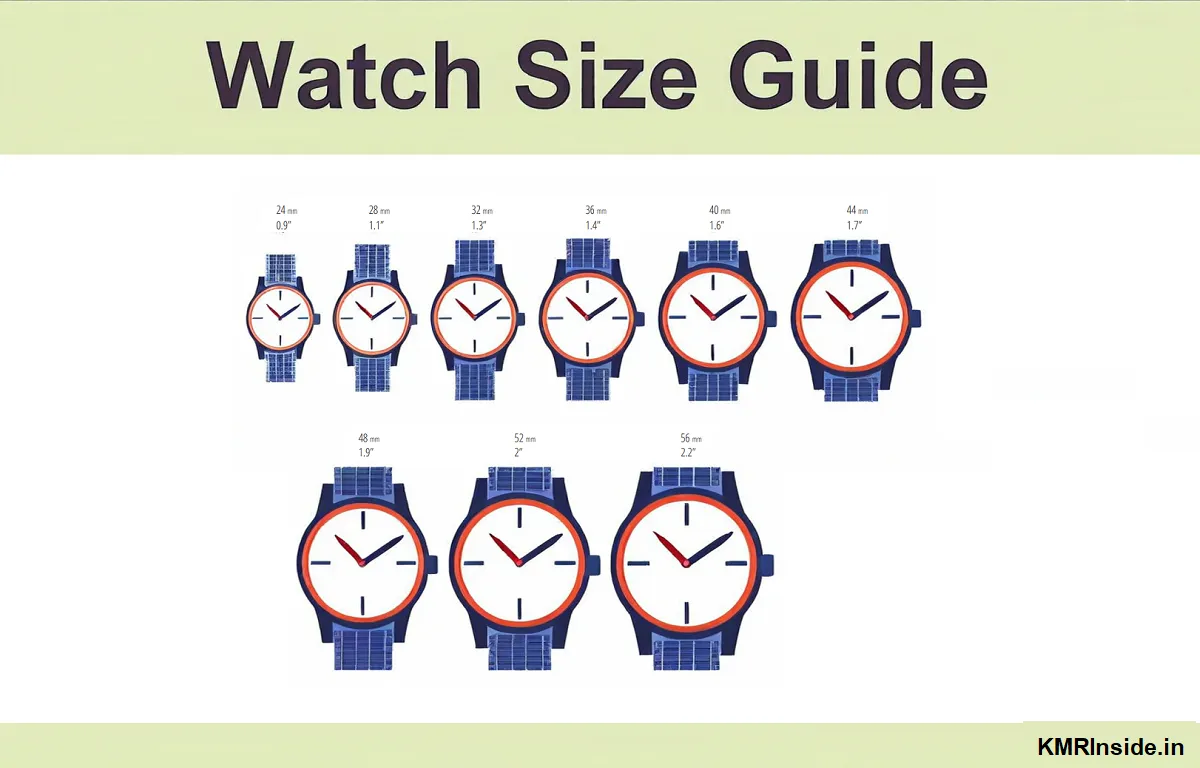
Buying a watch is not just about choosing a good brand or stylish design — the size matters too! If your watch is too big, it might look odd or feel heavy. If it’s too small, it may not suit your wrist or be hard to read. That’s why finding the right size watch for your wrist is super important, whether you’re buying online or from a store.
In India, most of us don’t really think much about watch sizes. We usually just pick something that “looks okay.” But the right fit can actually make a huge difference in comfort, style, and confidence. Whether you’re buying your first watch or adding another to your collection, knowing your ideal watch size can save you from regrets later.
In this article, we’ll break down everything in a simple way — from how to measure your wrist to which dial size suits which wrist type. So let’s help you find your perfect fit without any confusion!
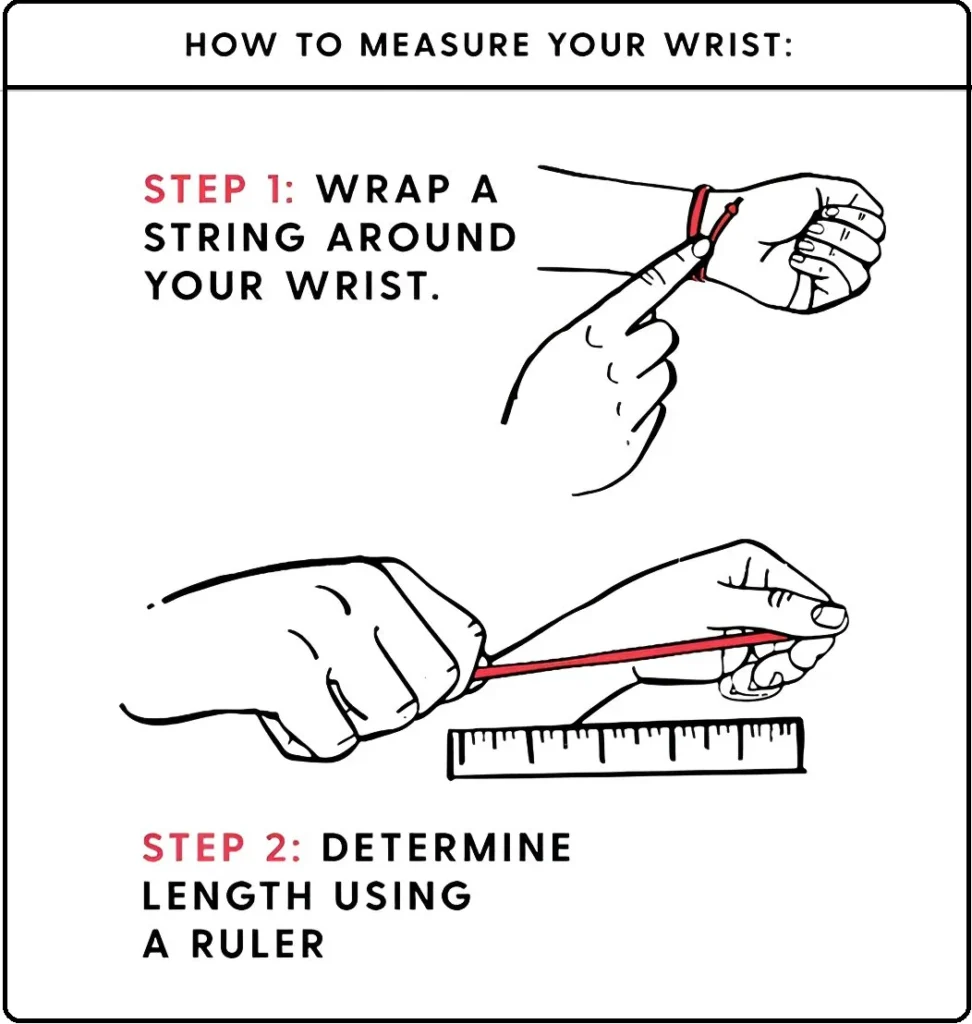
How to Measure Your Wrist?
- Use a flexible tape measure or string + ruler
- Wrap around your wrist bone (not too tight)
- Note the circumference in mm
Watch Case Size Recommendations:
| Wrist Size | Recommended Case Diameter | Brand Examples |
|---|---|---|
| <6 inches (Petite) | 28-36mm | Cartier Tank (Small), Titan Raga |
| 6-7 inches (Standard) | 38-42mm | Rolex Datejust, Tissot PRX |
| >7 inches (Large) | 42-46mm+ | Diesel Mega Chief, Panerai Luminor |
Style-Specific Sizing Tips:
✔ Dress Watches: Opt for thinner cases (6-8mm)
✔ Sports Watches: Can go larger (40-44mm)
✔ Women’s Watches: 28-34mm for elegance
Pro Tip:
- Try before buying – sizes vary by brand
- Oversized watches may look trendy but can be uncomfortable
Watch Size Chart Printable PDF:


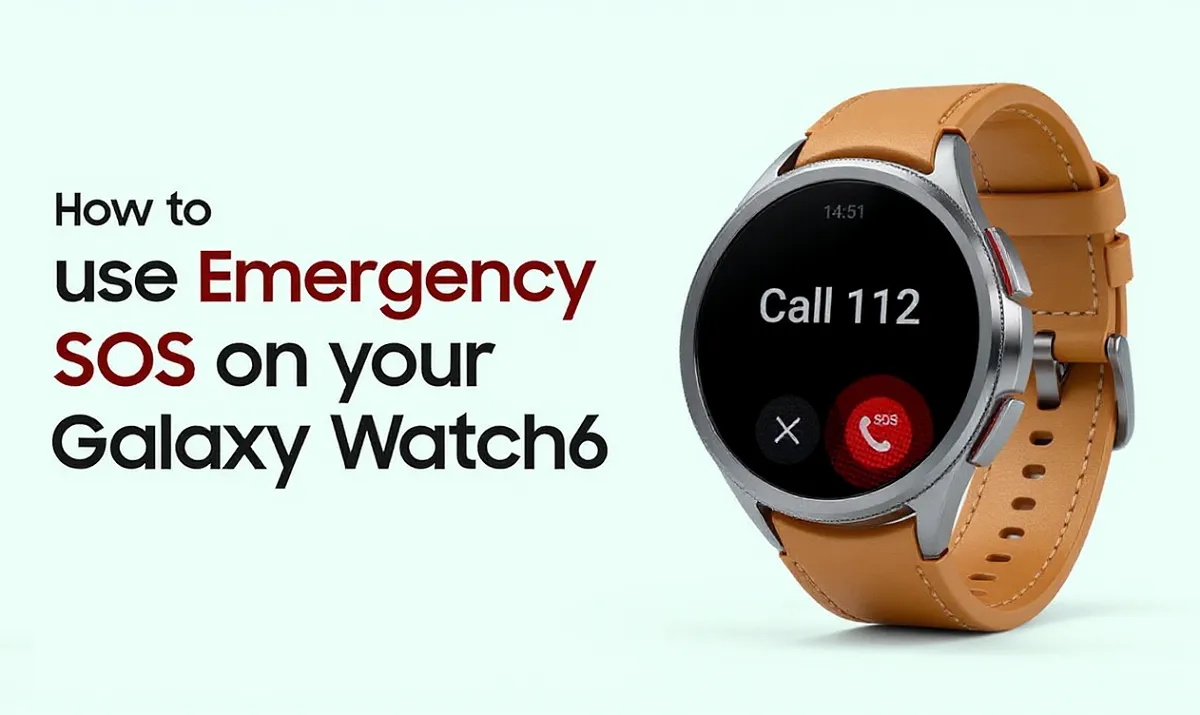
Hi! Did you know your Samsung Galaxy Watch can be a lifesaver in emergencies? Whether you’re walking home late, traveling alone, or just want extra safety, the Emergency SOS feature is super easy to use. Let’s break it down in simple steps so you’re always prepared!
Why Emergency SOS is an Important Feature?
Imagine you’re in trouble and need help fast—maybe you’ve hurt yourself, feel unsafe, or see someone else in danger. Instead of using your smartphone, just press a button on your Galaxy Watch, and it’ll alert your trusted contacts instantly.
How to Set Up Emergency Contacts?
Before using SOS, you need to add your emergency contacts. Here’s how:
- Open the Galaxy Wearable app on your phone (the one you use to control your watch).
- Tap Watch Settings → Safety and Emergency → Emergency Contacts.
- Hit Add Emergency Contacts and pick people you trust (family, friends, etc.).
- Tap Done—you’re all set!
Now, if something goes wrong, your watch knows who to call.
How to Trigger Emergency SOS?
This is where it gets really simple. Just:
- Quickly press the Home button (the one below the screen) 5 times in a row.
Your watch will automatically call your emergency contacts and share your location. No swiping, no searching—just fast help when you need it most.
Pro Tips for Using SOS Safely:
✅ Practice first! Try pressing the button 5 times (without sending an SOS) to get comfortable.
✅ Tell your contacts you’ve added them, so they know to take the call seriously.
✅ Keep your watch charged—you don’t want a dead battery in an emergency!
Final Thoughts:
Your Galaxy Watch isn’t just for fitness or messages—it’s a powerful safety tool. Setting up Emergency SOS takes just 2 minutes, but it could make all the difference someday. Stay safe, and share this with friends so they know how it works too!
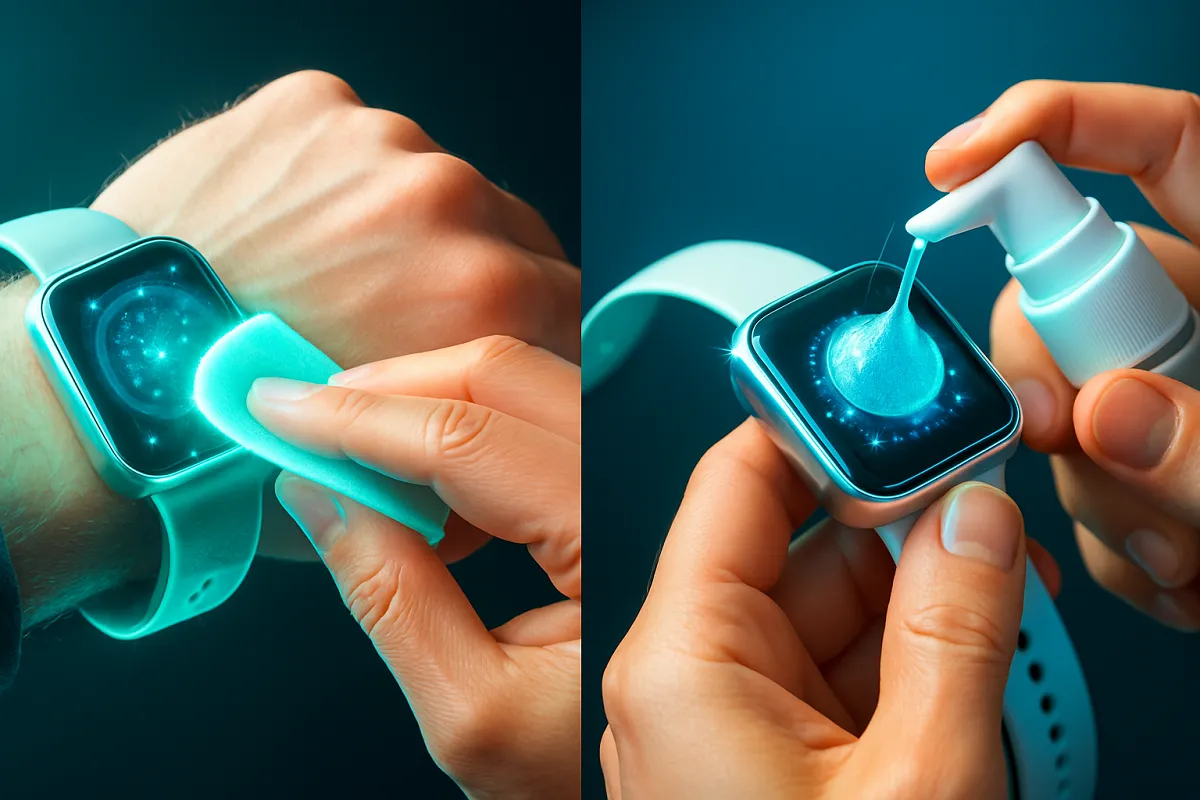
Keeping your smartwatch clean not only maintains its appearance but also ensures peak performance. Here’s a practical, no-cost routine using everyday household items:
1. Use a Microfiber Cloth:
Gently wipe the screen and body with a microfiber cloth every few days. This removes fingerprints, smudges, and light dirt while preserving the watch’s surface.
2. Mild Soap Solution for Deeper Cleaning:
Mix a little mild, unscented soap with water to create a gentle cleaning solution. Dampen a soft cloth—do not soak it—and wipe the watch face, case, and strap. Make sure no liquid enters the ports or crevices.
3. Clean Hard-to-Reach Areas with a Soft Brush:
Use a soft-bristled toothbrush (or cotton swab) to gently scrub around buttons, edges, and under bands. This helps dislodge stubborn grime without scratching the watch.
4. Dust and Debris Removal Tools:
A soft brush or compressed air is helpful for blowing out dust and loose particles from crevices. Alternatively, dental picks or cotton swabs work well in tight spots .
5. Disassemble for Thorough Cleaning (If Possible):
If your strap is removable, take it off before cleaning. Wipe it separately—with a mild soap solution for silicone/rubber or a dab of soap for fabric bands—and let it air-dry before reattaching.
6. Let It Fully Dry:
After cleaning, allow your watch and strap to air-dry completely, especially if you wiped them with a damp cloth. Avoid charging until all moisture is gone.
🧠 Reddit Tips from Real Users:
From threads like r/PixelWatch, users share practical, real-world advice:
“Microfiber cloth + lens cleaner. Spray the cloth, not the device.” (reddit.com)
“I use water and liquid soap on my bands… No problems. Just dry well.” (reddit.com)
These tips reinforce using gentle cleaners and ensuring your watch dries thoroughly.
✅ Check Before You Clean:
- Turn off your smartwatch and disconnect it from charging.
- Know its water-resistance rating (IP67, IP68). Even so, avoid immersing it in water.
- Never spray cleaner directly on the device. Always apply cleaning solution to cloths or swabs first.
🧼 Final Cleaning Routine Summary:
| Area | Tool | Method |
|---|---|---|
| Screen & Case | Microfiber cloth | Wipe gently every 2–3 days |
| Strap (silicone/rubber) | Mild soap + cloth | Wipe; scrub straps, rinse, dry |
| Crevices | Soft brush/swab | Clean around buttons, seams |
| Dusty Spots | Compressed air/brush | Blow out dirt from tight spaces |
| Drying | Air-dry | Let all parts dry thoroughly before reassembly |
Using these simple steps, you can safely and effectively keep your smartwatch clean—even without spending money on special cleaners. Want to know how to sanitize your charging cable or clean leather bands? Let me know!
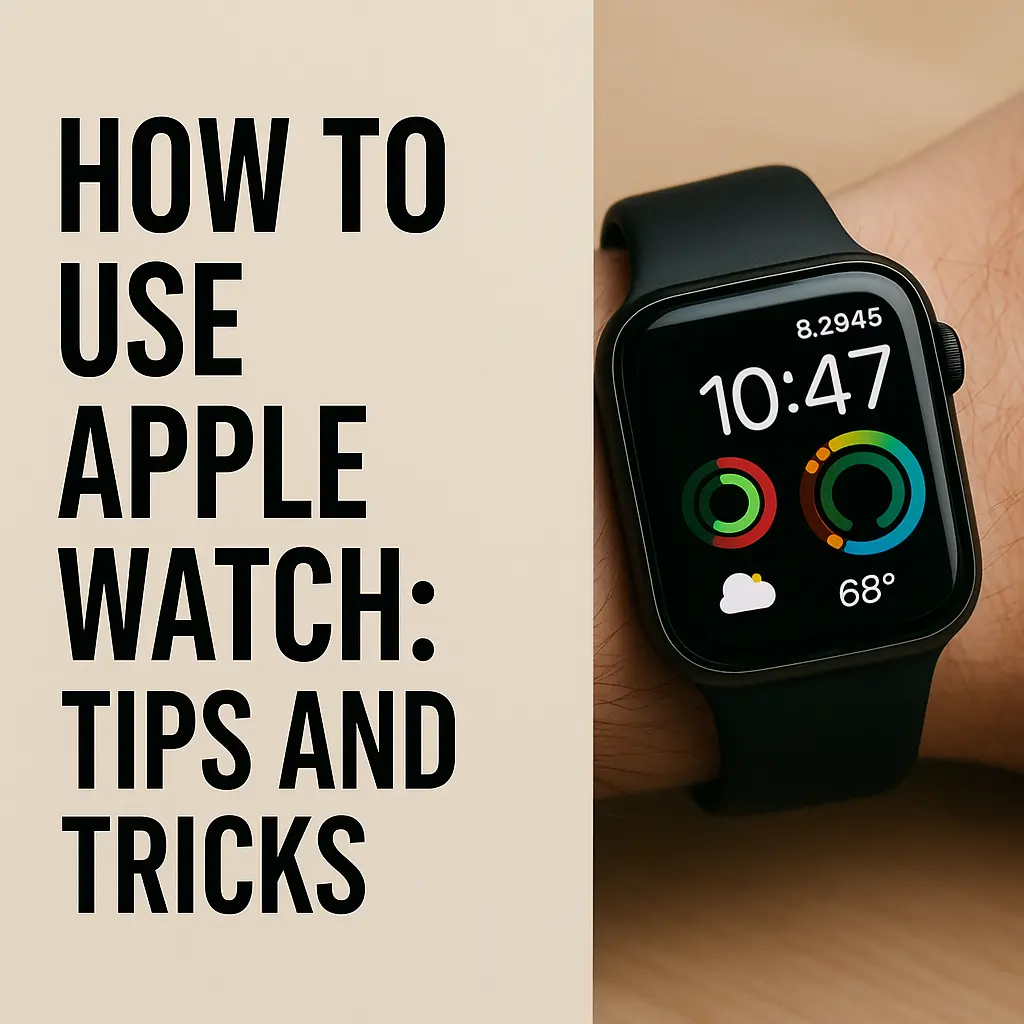
Hey there, friends! Today I want to dive into something super cool and a bit surprising: how Indians are using their Apple Watches in ways Apple probably never imagined. If you’ve ever wondered how this sleek gadget fits into our everyday Indian life—beyond just tracking your steps or showing you the time—stick around! I promise to keep things simple, chatty, and fun—just like a friend over a cup of chai.
1. From Fitness Tracker to Cricket Score Buddy 🏏
Why This Is Unique in India
In most countries, people use the Apple Watch mainly for fitness: counting steps, measuring heart rate, and logging workouts. While Indians do that too, here’s the twist:
- Live Cricket Score Complications: Several Indian developers have created “complications” (those little widgets on your watch face) that show live cricket scores. Imagine glancing at your wrist during school breaks to see India vs. Australia updates—no phone needed!
- Local Cricket Apps: Apps like Cricut and Recursive Cricket let you get ball-by-ball updates right on your watch face. This is a long-tail keyword in action—“live cricket score complication for Apple Watch in India”!
2. UPI Notifications on Your Wrist 💸:
How It Works?
UPI (Unified Payments Interface) is the lifeline of Indian digital payments. While Apple Pay isn’t officially in India, you can still get UPI notifications via the Watch:
- Link Your Bank App: Use apps like BHIM UPI or State Bank YONO. Enable push notifications on your iPhone.
- Mirror Alerts to the Watch: In your Watch app on the iPhone, enable “Mirror iPhone Alerts.” Now every UPI payment alert—be it “Rs.500 received from Mom”—pops up on your wrist.
Why It’s Awesome
- Instant Acknowledgment: No more fumbling for the phone when someone sends you pocket money.
- Discreet Checking: Sneak a peek at your balance without drawing attention in class or at the table.
3. Power Outage? Use Your Watch as a Flashlight! 🔦:
Indian Power Cuts Are Real
We all know that sometimes, the lights go off unexpectedly—whether it’s during that big IPL match or when you’re trying to finish homework. Enter the Apple Watch flashlight.
How to Use
- Swipe up on the watch face to open the Control Center.
- Tap the flashlight icon to illuminate the watch screen at max brightness.
- Perfect for finding the light switch in a dark room or checking the fuse box.
4. SOS for Safety—Especially for Women and Elderly 📲:
Built-In Emergency Features
Apple Watch has a hidden gem: Emergency SOS. You press and hold the side button, and it calls local emergency services (in India, dial 112) and notifies your emergency contacts.
Why It Matters in India
- Safety on the Go: Women travelling alone in metro trains or buses can discreetly trigger SOS without taking out their phone.
- Elderly Family Members: Grandma doesn’t need to learn how to dial—just press a button if she falls or feels unwell.
5. Custom Watch Faces with Indian Flair 🎨:
Personalization with Local Themes
Apple offers a variety of watch faces, but Indian watch owners take it to the next level:
- Bollywood Themes: From “DDLJ” romantic silhouettes to “KGF” action shots, you can find wallpapers and custom faces shared in WhatsApp groups.
- Festival Countdown Faces: A “Diwali Lights” watch face that shows days left until Diwali, complete with animated diyas.
How You Do It
- Download your favorite image or animation (always check for copyright-free sources!).
- Open the Photos app on iPhone, select the image, tap the Share button → Create Watch Face.
- Choose “Photos Watch Face” and customize complications.
6. Controlling Smart Homes—Indian Style 🏡:
Smart Gadgets in Desi Homes
From Mi fans to Philips Hue bulbs, more Indian homes are getting “smart.” Here’s how the Apple Watch comes into play:
- Mi Home Integration: If you’ve set up your Mi Smart Fan through HomeKit, you can turn it on/off or change the speed straight from your watch.
- TV and AC Control via HomeKit: Using BroadLink or a HomeKit bridge, you can adjust your air conditioner temperature or switch on the TV—without searching for the remote.
Why It’s Cool
- No More Remote-Hunting: Especially handy during IPL matches when the remote mysteriously disappears.
- Voice Commands via Siri: “Hey Siri, switch on the fan”—and voila, relief from the Mumbai heat!
7. Language Lessons on Your Wrist 🈯️:
Learning Hindi, Marathi, Tamil, and More
Language-learning apps like Duolingo and Memrise have Apple Watch companions. Indians use these for:
- Daily Word Practice: A Marathi word a day pops up as a notification—great for bilingual families.
- Quick Quiz Snippets: Multiple-choice questions you can answer on your wrist during bus rides.
Real-Life Impact
“My grandma is brushing up on English idioms,” laughs Neha from Kolkata. “She loves getting those Quizlet notifications on her watch.”
8. Health Tracking Beyond Steps—Yoga and Beyond 🧘♂️:
Embracing Yoga Natively
While the Watch’s Workout app has Yoga, Indians push it further:
- Third-Party Yoga Apps: Apps like Down Dog and Asana Rebel offer guided sessions. The Watch vibrates when it’s time to switch poses.
- Breathing Reminders in Local Languages: You can rename the Breathe app “Saans Lo” (take a breath) for a fun, desi twist.
Cultural Connection
Using an Apple Watch to track “Surya Namaskar” sets a lovely balance between tradition and technology.
9. Digital ID and Public Transport—A Glimpse of the Future 🚌:
Card Emulation and More
While Apple Wallet’s full NFC card emulation is limited in India, some urban areas have experimented with NFC-based transit:
- Dubai Metro as an Example (we wish!): Though not widely available, if Apple ever partners with local transit, Indians are ready to tap and go—through the Watch.
- Lok Sabha Tours: During special events, tickets can sometimes be loaded as passes, though this is still rare.
10. Music and Podcasts—Bollywood Beats on Your Wrist 🎶:
Seamless Entertainment
Indians love music—be it Bollywood, classical, or regional folk. The Watch makes it easy:
- Offline Playlists: Sync your Apple Music playlists (“Best of AR Rahman” or “Tamil Hits 2024”) for playback via Bluetooth earphones.
- Podcast Subscriptions: Catch up on The Musafir Stories or The Ranveer Show—no phone needed, just your Watch + AirPods.
11. Using the Watch as a Wedding Photographer’s Sidekick 📸:
Indian Weddings Are HUGE
From Haldi ceremonies to the bidaai, Indian weddings stretch across days. Photographers and guests use the Watch to:
- Remote Shutter Control: Position your iPhone camera on a tripod, use the Watch’s Camera Remote app to snap family photos from afar.
- Timer and Burst Shots: Perfect for capturing that synchronized dance performance.
12. Students and Study Timers—Desi Exam Prep ⏱️:
Pomodoro Technique on Your Wrist
Exam season in India is intense—students are always looking for ways to focus. Apple Watch apps like Focus Keeper let you:
- Set 25-Minute Study Sessions: Break with a five-minute stretch, then back to algebra.
- Track Study Streaks: Unlock a “7-day streak” badge—just like getting a gold star from your teacher.
Classroom Etiquette
With the Watch in silent mode, students discreetly glance at timers without disrupting class.
13. The “Missed Call” Replacement—Vibrating Alerts for Family Calls ☎️:
Cutting Through Phone Phobia
Some older relatives still prefer voice calls but miss important updates. With the Watch:
- Silent Vibrations: Your mom can feel the gentle tap and know it’s you calling.
- Custom Vibration Patterns: Assign special patterns for different contacts—so you know who’s calling without looking.
14. Spiritual Practices—Namaz and Puja Reminders 🛕🙏:
Gentle Nudge Toward Faith
Many Indians observe daily prayers. The Watch helps by:
- Prayer Time Apps: Apps like Muslim Pro and iPray vibrate to remind you of Namaz times.
- Puja Timers: Set hourly/quarterly reminders for lighting diyas or offering water to the Tulsi plant.
15. Helping the Differently-Abled—Innovative Assistive Uses ♿:
Beyond the Standard Features
Tech-savvy families are adapting the Watch for special needs:
- Taptic Doorbell Alerts: Elderly or hearing-impaired people get Taptic feedback when someone presses the SmartThings doorbell.
- VoiceOver with Regional Languages: Use the Watch’s screen reader in Hindi or Gujarati for visually impaired users.
Wrapping It Up: The Apple Watch, Desi Edition 🇮🇳✨:
So there you have it—a peek into the wonderfully creative ways Indians have made the Apple Watch truly their own. From checking live cricket scores between classes to discreetly accepting UPI payments, our tech-loving nation has found countless “unofficial” uses that go far beyond what Apple first imagined.
Key Takeaways:
- Cultural Customization: Indians love to personalize—so watch faces and complications get a desi twist.
- Utility Meets Tradition: Whether it’s yoga, puja reminders, or safety SOS, the Watch blends modern features with age-old practices.
- Student-Friendly Hacks: Study timers, silent alerts, and quick controllers help students juggle school life with tech.
- Smart Home & Remote Control: From fans to cameras, the Watch is the ultimate all-in-one remote in many Indian homes.
- Health and Safety: Emergency SOS, fall detection, and silent vibrations show how technology cares for every generation.
I hope you enjoyed this tour of “Indian Apple Watch hacks”—and maybe got a few ideas for your own wrist buddy! If you’ve discovered a cool way to use your Apple Watch, drop a comment below and share the love. Until next time, stay curious and keep exploring new ways to make technology work for you. 😊
P.S. If you’re writing a school project on “Apple Watch for Indian lifestyles” or just want to impress your friends, feel free to bookmark this post and come back when you need inspiration!

Honor Win & Honor Win RT: Simple Overview for Everyone

Xiaomi 17 Ultra Launched: Powerful Camera, Premium Design, and Top Performance

Realme 16 Pro Key Specifications Revealed Ahead of Its Official Launch

How Smartwatches Read Your Body Language — The Secret Behind It

Watch Wearers vs Non-Wearers — The Productivity Gap No One Talks About

The Psychology Behind Completing Watch Goals — Why It Feels So Addictive

Why Wrist Notifications Feel More Professional Than Phone Alerts

Smartwatches Are Becoming the New Social Status Symbol — Here’s Why

When Is It Okay to Look at Your Smartwatch? The Answer Might Shock You

Why Smartwatches Are Becoming the New Favourite Gift?
-

 Luxury Watches1 year ago
Top 10 Most Expensive Watches in India – Is Buying a Rs.1 Crore Watch Worth It?
-
 Smart Watches1 year ago
16 Best Smartwatches UNDER ₹1000 – Budget Smartwatch in India
-

 Luxury Watches1 year ago
Top 10 Ultra Luxury Watch Brands Worn by Billionaires
-

 Luxury Watches1 year ago
GST on Luxury Watches in India: A Complete Guide
-

 Luxury Watches1 year ago
Limited‑Edition Olam Chronograph: A Tribute to Kerala’s Boat Races
-
 Smart Watches1 year ago
The Best Smartwatches Under ₹2000 in India for 2025: Your Ultimate Guide
-

 Luxury Watches1 year ago
Best Brand Watches for Men in India (2025)
-
 Smart Watches1 year ago
Fire‑Boltt Ring X Features: BT Calling, Battery, Display and Price